
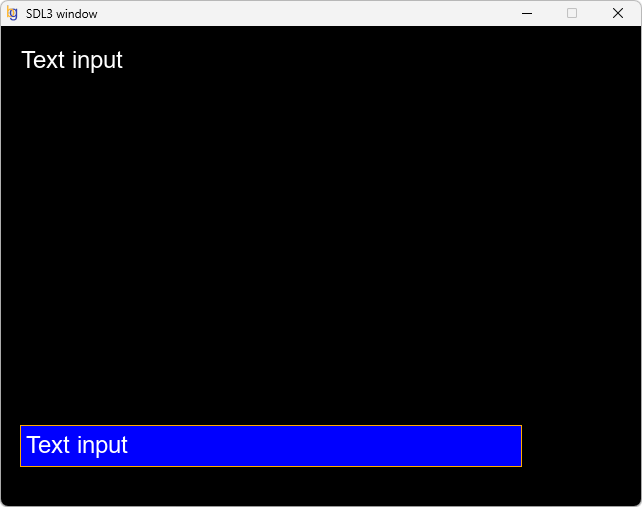
In this section, we will examine a program that uses the SDL3 and SDL3_ttf libraries to create a simple text input interface. This program accepts text input from the user, displays it on the screen, and controls the visual state of the text input box.
The program works as follows:
Variable declarations and purposes
Global variables that can be accessed by multiple functions at the beginning of the code defined.
Functions' operating logic
Code flow
The main.c file content will be as follows:
#include <SDL3/SDL.h>
#include <SDL3_ttf/SDL_ttf.h>
#include <stdio.h>
#include <stdlib.h>
#include <string.h>

#define WINDOW_WIDTH 640
#define WINDOW_HEIGHT 480
#define TEXT_BUFFER_SIZE 400

// Global variables
int is_running = false;        // Variable that controls the execution of the main loop of the program
SDL_Window *window = NULL;     // Main window variable
SDL_Renderer *renderer = NULL; // Renderer variable

TTF_Font *font = NULL;
char input_text[TEXT_BUFFER_SIZE] = "";
int text_length = 0;
int text_input_active = 0;
SDL_Rect rect_input = { 20, 400, 500, 40 };

// Function prototypes
int init_window(void);         // Create window and renderer
void init_vars(void);          // Initialize variables
void load_media(void);         // Load media
void process_event(void);      // Process events
void update_screen();          // Update values
void draw_screen(void);        // Draw screen
void destroy_window(void);     // Destroy window

int main(int argc, char* argv[])
{
    // Create window and renderer
    is_running = init_window();

    // Initialize variables
    init_vars();

    // Load media files
    load_media();

   // Main loop
    while (is_running) {
       process_event();     // Processing SDL events (Here keyboard inputs).
       update_screen();     // Updating variables
       draw_screen();       // Drawing objects on the window (Rendering)
    }

    // Destroy renderer and SDL window
    destroy_window();

    return 0;
}

// Create window and renderer
int init_window(void)
{
    // Initialize the SDL, Image and TTF libraries.
    if (SDL_Init(SDL_INIT_VIDEO) == false) {
        SDL_Log("SDL init error: %s\n", SDL_GetError());
        return false;
    }
    if (TTF_Init() == false) {
        SDL_Log("TTF init error: %s", SDL_GetError());
        return false;
    }

    // Create a window and a 2D rendering context for the window.
    if (!SDL_CreateWindowAndRenderer("SDL3 window", WINDOW_WIDTH, WINDOW_HEIGHT, 0, &window, &renderer)) {
        SDL_Log("SDL_CreateWindowAndRenderer() error: %s", SDL_GetError());
        return false;
    }

    return true;
}

// Initialization function that runs only once at the beginning of the program
void init_vars(void)
{

}

// Load image to texture
void load_media(void)
{
    // Loading a font
    font = TTF_OpenFont("arial.ttf", 24);
    if (font == NULL) {
        SDL_Log("Font loading error: %s", SDL_GetError());
    }
}

// Function to control SDL events and process keyboard inputs
void process_event(void)
{
    SDL_Event event;

    // Creating a loop to process user inputs
    while (SDL_PollEvent(&event)) {
       switch (event.type) {

          case SDL_EVENT_KEY_DOWN: // Indicate that a key was pressed.
               switch (event.key.key) {
                  case SDLK_C:
                       if (!text_input_active) {
                           SDL_Log("Text entry started.");
                           text_input_active = 1;
                           input_text[0] = '\0';
                           SDL_SetTextInputArea(window, &rect_input, 5);
                           SDL_StartTextInput(window); // Start text input
                       }
                       break;
                  case SDLK_RETURN:
                  case SDLK_KP_ENTER:
                       if (text_input_active) {
                           SDL_Log("Text entry terminated.");
                           text_input_active = 0;
                           SDL_StopTextInput(window); // Stop text input
                       }
                       break;
                  case SDLK_BACKSPACE:
                       if (text_input_active && text_length > 0) {
                           text_length--;
                           input_text[text_length] = '\0';
                       }
                       break;
                  case SDLK_ESCAPE:
                       is_running = false;
                       break;
               }
               break;

          case SDL_EVENT_TEXT_INPUT:
               if (text_input_active) {
                   if (text_length + strlen(event.text.text) < TEXT_BUFFER_SIZE) {
                       strcat(input_text, event.text.text);
                       text_length += strlen(event.text.text);
                   }
               }
               break;

          case SDL_EVENT_QUIT: // Logout action by the user (x button at the top right of the window)
               is_running = false; // Terminates the execution of the program main loop.
               break;
       }
    }
}

// Updates objects in the main window
void update_screen(void)
{

}

// Render function used to draw game objects in the main window
void draw_screen(void)
{
    SDL_SetRenderDrawColor(renderer, 0, 0, 0, 255);
    SDL_RenderClear(renderer); // Clear the current rendering target

    if (text_input_active) {
        SDL_FRect f_rect_frame = { (float)rect_input.x-1, (float)rect_input.y-1, (float)rect_input.w+2, (float)rect_input.h+2 };
        SDL_SetRenderDrawColor(renderer, 255, 170, 0, 255); // Frame color
        SDL_RenderRect(renderer, &f_rect_frame);

        SDL_FRect f_rect_input = { (float)rect_input.x, (float)rect_input.y, (float)rect_input.w, (float)rect_input.h };
        SDL_SetRenderDrawColor(renderer, 0, 0, 255, 255); // Text input rect background color
        SDL_RenderFillRect(renderer, &f_rect_input);
    }

    if (text_length > 0) {
        SDL_Color textColor = { 255, 255, 255, 255 }; // Text color
        SDL_Surface* texture_surface = TTF_RenderText_Blended(font, input_text, strlen(input_text), textColor);

        if (texture_surface) {
            SDL_Texture* texture_text = SDL_CreateTextureFromSurface(renderer, texture_surface);

            if (texture_text) {
                SDL_FRect renderQuad;

                // Writing text into the text input field
                if (text_input_active) {
                    int padding = 5;
                    renderQuad.x = (float)rect_input.x + padding;
                    renderQuad.y = (float)rect_input.y + padding;
                    renderQuad.w = (float)texture_surface->w;
                    renderQuad.h = (float)texture_surface->h;
                    if (renderQuad.w > rect_input.w - 2 * padding) {
                        renderQuad.w = (float)(rect_input.w - 2 * padding);
                    }
                    if (renderQuad.h > rect_input.h - 2 * padding) {
                        renderQuad.h = (float)(rect_input.h - 2 * padding);
                    }
                    SDL_RenderTexture(renderer, texture_text, NULL, &renderQuad);
                }

                // Writing text to the main window
                renderQuad.x = 20.00;
                renderQuad.y = 20.00;
                renderQuad.w = (float) texture_surface->w;
                renderQuad.h = (float) texture_surface->h;
                SDL_RenderTexture(renderer, texture_text, NULL, &renderQuad);

                SDL_DestroyTexture(texture_text);
            }
            SDL_DestroySurface(texture_surface);
        }
    }

    // Present the rendered content to the screen
    SDL_RenderPresent(renderer);
}

// Destroy Renderer and SDL window, exit from SDL3
void destroy_window(void)
{
    SDL_DestroyRenderer(renderer);
    SDL_DestroyWindow(window);
    SDL_Quit();
}